SpectraLayers Pro 13 Review: AI Tools for Voice, Unmixing and Sound Design
SpectraLayers Pro 13 Review: AI Tools for Voice, Unmixing and Sound Design
Steinberg SpectraLayers Pro 13 separates voices, instruments and unwanted sounds directly in the spectrogram. The update expands its already powerful unmixing features with tools for sound effects, dialogue restoration and AI-assisted reconstruction. Our review shows why SpectraLayers remains one of the most versatile specialist tools for post production, field recording and creative sound design.
Published 6:42 am on Thursday 22nd October 2026 by Beat Magazine
With SpectraLayers Pro 13, Steinberg further develops its spectral editor for audio restoration, dialogue processing and creative sound design. The software displays audio as a spectrogram, where individual sound elements can be selected, attenuated, repaired or moved to separate layers. ARA 2 also provides close integration with compatible DAWs such as Cubase and Nuendo.
Powerful unmixing tools
Unmixing remains one of SpectraLayers' key strengths. Songs can be separated into vocals, drums, bass, guitars and other components, while drum parts can be broken down even further. With well-produced source material, the results provide useful stems for remixes, corrective work and creative editing. Heavy reverb, chorus effects and dense arrangements can, however, lead to audible artifacts.
One of the most interesting additions is Unmix Sound Effects. It separates short events such as coughs, door slams or birdsong from continuous ambient sound. This can save considerable manual work when editing field recordings, live material and film audio. Unmix Components has also been enhanced, splitting tonal components, transients and noise onto separate layers. This makes it possible to edit a guitar attack independently or extract only the percussive structure from a complex sample.
AI-assisted audio repair
Removing unwanted sounds often leaves an audible gap. Ambience Heal attempts to fill this space with suitable room tone or background ambience. It works particularly well for short corrections in consistent sonic environments.
Reconstruct goes further by resynthesising missing spectral components based on surrounding audio. Tonal material, transients and noise can be adjusted independently. This is highly useful for small damaged areas, although longer and more complex passages can reveal the limits of the process. In many cases, Attenuate offers the more transparent alternative by matching the level of a distracting sound to its surroundings instead of removing it entirely.
Improved voice and dialogue processing
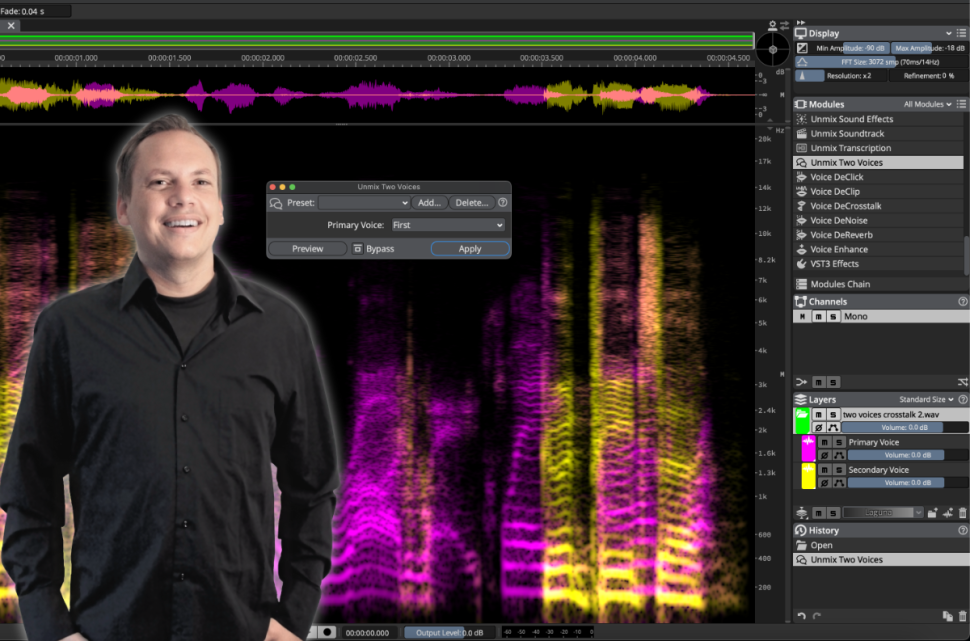
Version 13 also makes clear progress in speech processing. Voice DeClick reduces mouth noises, tongue clicks and other minor distractions in close-mic recordings. Unmix Two Voices separates two speakers onto individual layers without prior training. Particularly useful is Voice DeCrosstalk, which can isolate an unwanted second voice even when it overlaps with the main speaker.
Results naturally depend on the source material. Separation is impressive when voices differ clearly, while similar timbres, substantial room sound and strong overlap are more likely to produce artifacts. Together with DeNoise, DeReverb, DePlosive and Voice Denoiser, SpectraLayers nevertheless offers a remarkably comprehensive toolkit for dialogue and voice restoration.
Faster everyday workflow
A range of smaller improvements makes SpectraLayers Pro 13 smoother to use. Selections can be scaled more flexibly, fades can be applied directly and copied material can be placed with greater precision. Layout presets, module search and new shortcuts improve navigation, while Level Check and expanded batch processing speed up analysis and repetitive work.
The software is also a strong sound-design tool. Individual events can be extracted from field recordings or complex samples and turned into new textures, percussion and atmospheres. RipX and Melodyne still offer more advanced note-based editing, though, while high-quality AI processing can require substantial processing time with longer files.
Verdict
SpectraLayers Pro 13 builds effectively on its established strengths. Unmix Sound Effects and the new voice modules make this update particularly appealing for post production and dialogue work. Ambience Heal and Reconstruct perform well on smaller problem areas, while detailed spectral editing offers plenty of creative freedom. A powerful professional tool for restoration, audio post production and sound design.
Product details
Developer: Steinberg
Formats: ARA 2, VST3, AAX
System: Windows and macOS, 64-bit
Price: 359 Euro, SpectraLayers Elements 90 Euro, upgrades from 289 Euro
Subscribe to the digital edition of BEAT Magazine via Plugins-Samples.com and get more gear, in-depth workshops, reviews and 11 GB exclusive plugins and new sounds with every monthly issue!